---
title: How to embed YouTube videos into Centercode
description: Embed YouTube videos seamlessly in Centercode to enhance user engagement. Follow these steps and troubleshoot if needed.
---
[Skip to content](https://learn2.centercode.com/en/embed-youtube-into-centercode#main-content)
English
Show submenu for translations
[Report an Issue](https://learn2.centercode.com/en/kb-tickets/new?hsLang=en) [Customer portal](https://help.centercode.com/admin-portal?hsLang=en)
![New\_Centercode\_Logo.png\]](https://learn2.centercode.com/hs-fs/hubfs/New_Centercode_Logo.png?height=35&name=New_Centercode_Logo.png)
- [Centercode Blog](https://www.centercode.com/blog)
Open main navigation
Close main navigation
- [Centercode Blog](https://www.centercode.com/blog)
- English
Show submenu for translations
- [Report an Issue](https://learn2.centercode.com/en/kb-tickets/new)
- [Customer portal](https://help.centercode.com/admin-portal)
- Starter & Delta Edition Help
Starter & Delta Edition Help
How can we help?
- There are no suggestions because the search field is empty.
1. [Legacy Help Center](https://learn2.centercode.com/en?hsLang=en)
2. [Enhanced Integrations & APIs](https://learn2.centercode.com/en/enhanced-integrations-apis?hsLang=en)
3. [Integration Center Endpoints](https://learn2.centercode.com/en/enhanced-integrations-apis?hsLang=en#integration-center-endpoints)
# How to embed YouTube videos into Centercode
## Provide seamless and engaging video resources directly within the Centercode interface
This article applies to **Pro**, **Team**, and **Legacy** editions.
*Note that while Centercode’s integration features are intended to be approachable by a Centercode Program Manager, you might need to enlist help from an internal technical resource and refer to our* [*vocabulary and troubleshooting documentation*](http://help.newsite.centercode.com/knowledge/understanding-integration-terms-and-troubleshooting-status-codes?hsLang=en)*.*
Integrating YouTube into your Centercode platform utilizes YouTube’s Embed feature and the Centercode Visual Editor’s (CVE - the WYSIWYG used within the system) “source” feature. To complete this integration, you’ll need:
- A published YouTube video with embedding permissions
- Access to creating Centercode content or releases at the intended level
### Acquiring the YouTube embed code
Read more about retrieving the embed code on [this YouTube support page](https://support.google.com/youtube/answer/171780?hl=en-GB&sjid=6680924423324121274-NA).
Here are the highlights:
1. Go to the YouTube video you want to embed
2. Click on the **Share** button located under the video
3. Click on the **Embed** button
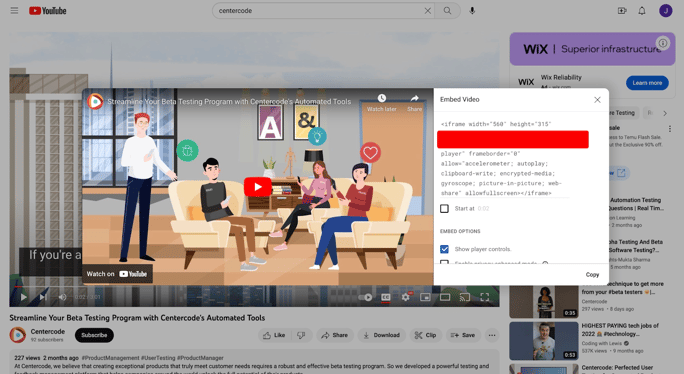
4. Choose the size of the video player by selecting one of the available options
5. Copy the HTML **Embed code** provided
#### Embedding a YouTube video into content or a release
The next step is to insert the embed code into the Centercode resource of your choice. Typically, this will be content or releases. In this example, we’ll insert the YouTube video into project-level content.
From your Project Home:
1. Click the **Management** menu, then **Content** to access Content Management
2. Create new content or modify an existing one
3. Within the Modify content page, select the **Media** drop-down menu and select **Embed Code**

4. Paste the embed code for the YouTube video you want to insert
5. Complete any additional, optional fields
6. Click **Submit**
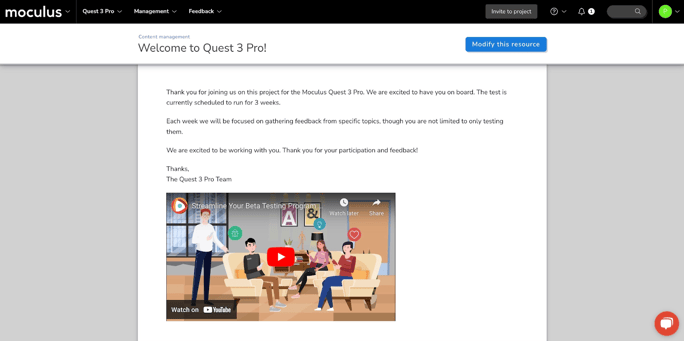
If your YouTube video’s access was set properly and the embed code was copy-pasted correctly, viewing the content should now include the embedded YouTube video as shown below:
### Troubleshooting your embed
**My video is not displaying in Centercode**
There are a few reasons why your embedded video content may not be displaying properly.
1. Double-check your copied embed code to make sure it does not contain special characters
2. Double-check the permissions of the video content on YouTube to ensure you can embed this content
3. Try inserting the embed code into the source directly via the WYSIWYG editor
4. Try pasting the URL to your YouTube video in the Media drop-down menu
If all else fails, don’t hesitate to reach out to the Centercode Support team for further assistance.
**I want to adjust the alignment of the embedded video**
If you want to align the content in the center or to the right, you may need to manually add those specifications in the source on the WYSIWYG. The video below demonstrates this process:
- [Customer Training & Centercode Basics](https://learn2.centercode.com/en/customer-training-centercode-basics?hsLang=en#main-content)
- [Customer Video Training](https://learn2.centercode.com/en/customer-training-centercode-basics?hsLang=en#customer-video-training)
- [Centercode FAQs](https://learn2.centercode.com/en/customer-training-centercode-basics?hsLang=en#centercode-faqs)
- [Centercode Basics](https://learn2.centercode.com/en/customer-training-centercode-basics?hsLang=en#centercode-basics)
- [Community Administration](https://learn2.centercode.com/en/community-administration?hsLang=en#main-content)
- [Initial Configuration](https://learn2.centercode.com/en/community-administration?hsLang=en#initial-configuration)
- [Community Administration](https://learn2.centercode.com/en/community-administration?hsLang=en#community-administration)
- [Project Setup & Administration](https://learn2.centercode.com/en/project-setup-administration?hsLang=en#main-content)
- [Project Creation](https://learn2.centercode.com/en/project-setup-administration?hsLang=en#project-creation)
- [Recruiting](https://learn2.centercode.com/en/project-setup-administration?hsLang=en#recruiting)
- [Project Administration](https://learn2.centercode.com/en/project-setup-administration?hsLang=en#project-administration)
- [Macros and Automation](https://learn2.centercode.com/en/project-setup-administration?hsLang=en#macros-and-automation)
- [User Management](https://learn2.centercode.com/en/user-management?hsLang=en#main-content)
- [Surveys](https://learn2.centercode.com/en/user-management?hsLang=en#surveys)
- [Content & Resources](https://learn2.centercode.com/en/user-management?hsLang=en#content-resources)
- [Tester & User Management](https://learn2.centercode.com/en/user-management?hsLang=en#tester-user-management)
- [Feedback Management](https://learn2.centercode.com/en/feedback-management?hsLang=en#main-content)
- [Feedback Collection](https://learn2.centercode.com/en/feedback-management?hsLang=en#feedback-collection)
- [Feedback Triage & Moderation](https://learn2.centercode.com/en/feedback-management?hsLang=en#feedback-triage-moderation)
- [Reporting](https://learn2.centercode.com/en/reporting?hsLang=en#main-content)
- [Delta Dashboards](https://learn2.centercode.com/en/reporting?hsLang=en#delta-dashboards)
- [Custom Reports](https://learn2.centercode.com/en/reporting?hsLang=en#custom-reports)
- [Enhanced Integrations & APIs](https://learn2.centercode.com/en/enhanced-integrations-apis?hsLang=en#main-content)
- [Integration Center Endpoints](https://learn2.centercode.com/en/enhanced-integrations-apis?hsLang=en#integration-center-endpoints)
- [Single Sign-On Integrations](https://learn2.centercode.com/en/enhanced-integrations-apis?hsLang=en#single-sign-on-integrations)
- [Centercode Guides to Simple API Integrations](https://learn2.centercode.com/en/enhanced-integrations-apis?hsLang=en#centercode-guides-to-simple-api-integrations)
- [Centercode Guides to Endpoint Specific Systems](https://learn2.centercode.com/en/enhanced-integrations-apis?hsLang=en#centercode-guides-to-endpoint-specific-systems)
- [Enhanced Integrations Troubleshooting](https://learn2.centercode.com/en/enhanced-integrations-apis?hsLang=en#enhanced-integrations-troubleshooting)
- [Troubleshooting & Miscellaneous](https://learn2.centercode.com/en/troubleshooting-miscellaneous?hsLang=en)
- [Announcements and Releases](https://learn2.centercode.com/en/announcements-and-releases?hsLang=en#main-content)
- [C17 - The Delta Release](https://learn2.centercode.com/en/announcements-and-releases?hsLang=en#c17-the-delta-release)
- [Centercode's GoEarly Program](https://learn2.centercode.com/en/announcements-and-releases?hsLang=en#centercodes-goearly-program)
- [Update Archive](https://learn2.centercode.com/en/announcements-and-releases?hsLang=en#update-archive)
- [Centercode Blog](https://www.centercode.com/blog)
[](https://help.centercode.com?hsLang=en)
Centercode Help Center
Copyright © 2026, Centercode
```json
{
"@context" : "https://schema.org",
"@type" : "VideoObject",
"contentUrl" : "https://6039523.fs1.hubspotusercontent-na1.net/hubfs/6039523/CS%20KBA%20-%20Youtube%20Embed%20Video.mp4",
"dateModified" : "2023-05-05T01:29:58.870Z",
"duration" : "PT27S",
"height" : 834,
"name" : "CS KBA - Youtube Embed Video",
"thumbnailUrl" : "https://www2.centercode.com/hubfs/CS%20KBA%20-%20Youtube%20Embed%20Video.mp4/medium.jpg",
"uploadDate" : "2023-05-05T01:29:29.471Z",
"width" : 1676
}
```
```json
{
"@context" : "https://schema.org",
"@type" : "VideoObject",
"contentUrl" : "https://6039523.fs1.hubspotusercontent-na1.net/hubfs/6039523/CS%20KBA%20-%20YouTube%20Embed%20Troubleshooting.mp4",
"dateModified" : "2023-05-05T01:36:02.265Z",
"duration" : "PT10S",
"height" : 836,
"name" : "CS KBA - YouTube Embed Troubleshooting",
"thumbnailUrl" : "https://www2.centercode.com/hubfs/CS%20KBA%20-%20YouTube%20Embed%20Troubleshooting.mp4/medium.jpg",
"uploadDate" : "2023-05-05T01:35:45.462Z",
"width" : 1680
}
```